
The "Work Smarter" Myth Cracked (3/18): Cognitive Load Theory
The Science Your Productivity System Is Ignoring
You receive an urgent Sponsor email whilst preparing for a key call. Whilst reading the email, you remember you forgot to follow up on a submission. That reminds you about the budget variance in France you need to calculate. Which makes you think about the patient recruitment strategy update due Wednesday. And now you've completely lost track of what the Sponsor email actually said.
Sound familiar?
This isn't poor time management. This isn't lack of discipline. This is your brain's working memory hitting its hard biological limit.
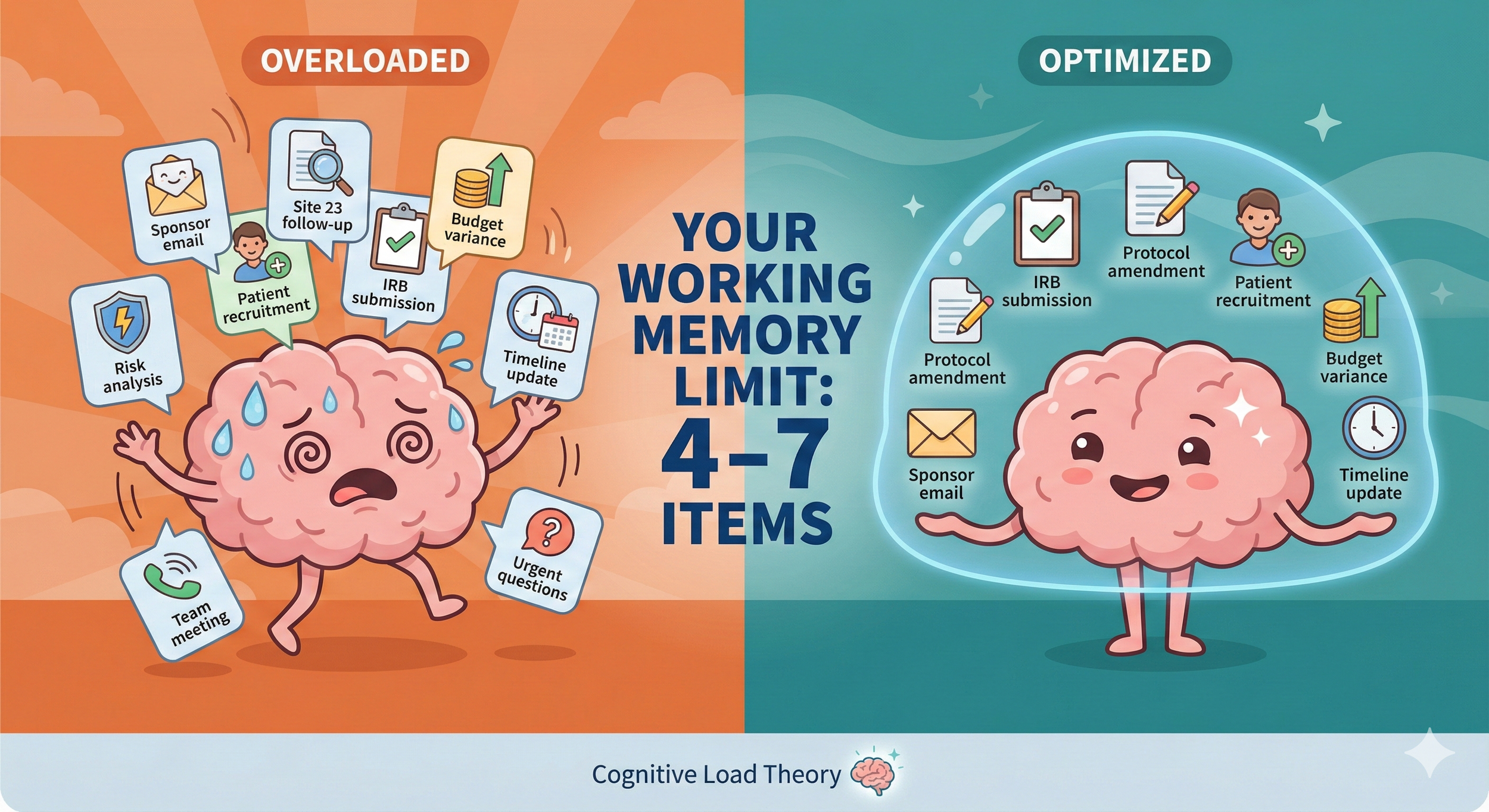
Your working memory, the part of your brain that actively processes information right now, can hold approximately 4 to 7 pieces of information simultaneously. That's it. Not 47. Not even 17. Four to seven.
Think of working memory as your brain's desktop. You can only have a limited number of files open at once. Try to open more, and your system crashes. In neuroscience terms, your prefrontal cortex becomes overloaded, decision quality drops, errors increase, and exhaustion sets in.
The Three Types of Cognitive Load
Not all mental effort is created equal. Cognitive load theory identifies three distinct types:
1. Intrinsic Load: The inherent complexity of the task itself. Understanding ICH-GCP requirements, navigating regulatory submissions, managing multi-country trials, etc. these are genuinely complex. This load is unavoidable in clinical research.
2. Extraneous Load: Unnecessary mental effort from poor systems or distractions. Searching through 47 emails to find one protocol amendment. Trying to remember which contact said what. Repeatedly looking up information you "know you have somewhere." This load is entirely preventable.
3. Germane Load: The productive effort of learning and building expertise. Recognising patterns from past projects. Developing strategic thinking. Building genuine capability. This is the load you want.
Intrinsic load is unavoidable in clinical research as the work is genuinely complex. owever, extraneous load is where overwhelmed PM/PDss are bleeding mental capacity. Reducing extraneous load doesn't make you less capable; it makes you MORE capable of handling the intrinsic complexity that actually matters.
What Cognitive Overload Actually Looks Like
Let me paint a picture of what's happening in your brain right now.
You're trying to hold in working memory:
15 open actions from yesterday's Sponsor call
Budget variance calculations for three countries
Timeline dependencies for patient recruitment
Risk mitigation strategies for protocol deviations
Draft responses to three different stakeholder emails
Meeting prep for this afternoon's Governance review call
Your working memory is shattered across dozens of items. This creates the exhausting sensation of "I'm working constantly but accomplishing nothing."
Every piece of information you try to hold in working memory is stealing capacity from strategic thinking. Your brain literally cannot do high-level analysis when it's using precious working memory to remember who needs what. This explains why you feel most exhausted on days when you've been "just answering emails" or "just in meetings." You weren't doing strategic work, but your brain was attempting to hold massive amounts of context, switching between topics every few minutes, and preventing any single piece of work from receiving your full cognitive capacity.
The Six-Step Cognitive Load Management Protocol
Step 1: Conduct a Cognitive Load Audit
Before you can reduce cognitive load, you need to see where it's coming from. For one full day, note every time you:
Search for information you "know you have somewhere"
Interrupt one task to handle another, then forget where you were
Re-read an email because you don't remember the details
Think "I need to remember to..."
Feel mentally foggy or unable to focus
Count these instances. Most overwhelmed PM/PDs have 30+ daily cognitive load drains.
This audit isn't about judging yourself. It's about making visible the invisible drains on your mental capacity.
Step 2: Identify Your Extraneous Load Sources
Review your audit and categorise your cognitive drains:
Information Retrieval Drains:
Searching emails for specific information
Looking up site contact details repeatedly
Finding previous versions of documents
Remembering which stakeholder said what
Task Switching Drains:
Email notifications interrupting focused work
"Quick questions" from team members
Unscheduled Sponsor requests
Meeting prep scattered throughout the day
Decision Drains:
Routine choices that don't need your expertise (email response priorities, meeting scheduling, template selection)
Repeated similar decisions (site communication formats, update report structures)
Memory Drains:
Action items you're "keeping in mind"
Deadlines you're "aware of"
Follow-ups you're "planning to do"
The pattern you'll notice: Most of these drains are preventable with better external systems.
Step 3: Offload to External Systems
If your brain doesn't need to hold it RIGHT NOW for active processing, get it out of your head. Create your external memory systems:
Information Repository: One master project folder structure (always the same across projects)
Task Management System: Single source of truth for all actions (not email, not memory) with context details, visible dependencies visible (what's blocking what) and weekly review process (not daily reinvention)
Decision Templates: Email response frameworks (not composing from scratch each time), communication templates (structure decided once, used repeatedly), escalation decision trees (clear triggers, no mental deliberation), etc
Ask yourself: can someone cover your project with 30 minutes of reading your systems? If not, too much lives in your head.
Step 4: Batch Cognitive Work Types
Your brain processes different types of work differently. Mixing them creates massive extraneous load.
High Cognitive Demand Work (fresh working memory required): Strategic planning, complex problem-solving, sponsor relationship strategy, risk analysis & mitigation planning, budget modelling, etc. Schedule these during your peak mental clarity (usually morning). Protect this time fiercely.
Medium Cognitive Demand Work (routine expertise): Sponsor calls, internal meetings, status report reviews, timeline updates, etc. Schedule mid-day when you're functional but not at peak.
Low Cognitive Demand Work (procedural, can be automated): Routine email responses, administrative updates, file organisation, meeting scheduling, etc. Schedule during your mental low points (usually mid-afternoon) or delegate/automate entirely.
Never mix these. Jumping from strategic Sponsor planning to administrative email to risk analysis creates extraneous load that can drain your working memory by 40%.
Step 5: Use AI as Working Memory Extension
AI tools can hold context you'd otherwise keep in working memory.
Instead of holding "I need to follow up on X, check budget variance for France, draft patient recruitment strategy update, and prepare for Wednesday's Sponsor call" in your head, dump it all into Claude or ChatGPT with:
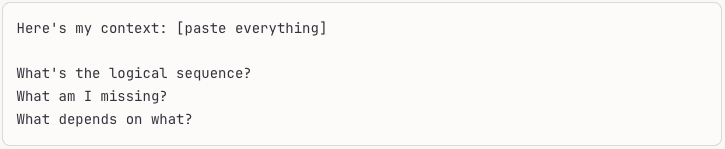
Your working memory is now free for actual thinking, not information storage.
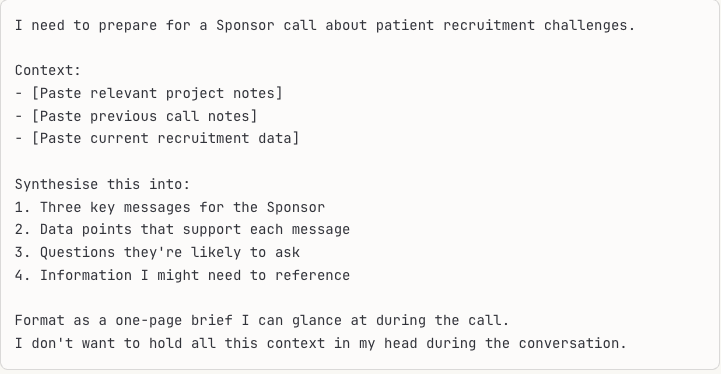
Information Synthesis (reduce retrieval load):
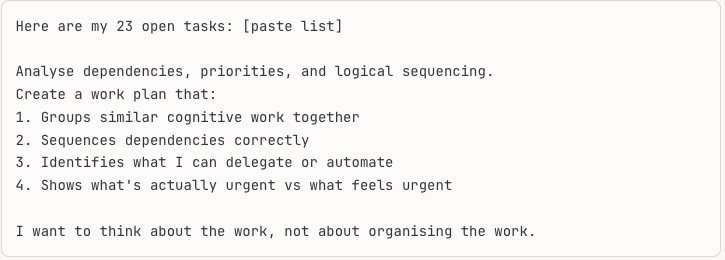
Task Sequencing (reduce planning load):
This type of strategic AI implementation, using tools to extend your cognitive capacity rather than just automate tasks, is exactly what we develop in AI training for clinical research teams.
Step 6: Implement "Cognitive Closure" Rituals
Before closing your laptop:
Brain dump everything you're "keeping in mind" into your task system
Note any open loops ("waiting for X from Y")
Identify tomorrow's top 3 priorities (decided now, not at 8am tomorrow)
Clear your mental desktop completely
This prevents the 11pm "Oh no, I forgot about..." moments and lets your brain actually rest overnight.
Your brain continues processing unresolved items even when you're not consciously thinking about them. This overnight cognitive load prevents restorative sleep and keeps your stress response activated. The closure ritual signals to your brain: "These items are captured. You can stop holding them."
Let me show you how this transforms daily reality.
Before Cognitive Load Management:
Marcus (a Project Director) started his Tuesday juggling three oncology studies. He checked email whilst on hold for a site call. During the site call, he remembered he needed to follow up on budget approvals. After the call, he couldn't remember the site's main concern. He spent 20 minutes searching old emails to find protocol version history. He started drafting a Sponsor update, got interrupted by a team question, and forgot to send the draft. By 3pm, he'd accomplished nothing meaningful despite constant activity.
After Cognitive Load Management:
Marcus's Tuesday began with his "high cognitive demand" block (90’ of strategic Sponsor planning with no interruptions). His external systems held all project details, so his working memory focused entirely on strategic thinking. Mid-morning, he batched three calls back-to-back (medium cognitive demand). His contact log and call templates meant zero information retrieval drain. After lunch, he used AI to synthesise recruitment data for Wednesday's meeting, offloading the analysis work. Late afternoon (low cognitive demand time), he processed routine emails using response templates. His end-of-day closure ritual took 10 minutes, clearing his mental desktop completely.
The difference? Marcus's working memory was available for actual thinking, not storage and retrieval.
This shift from reactive task execution to strategic cognitive capacity management is a cornerstone of brain-based coaching for clinical research professionals building the awareness and systems that free up mental bandwidth for high-value work.
Quick Wins: Start Today
Today (15 minutes):
Do a one-hour cognitive load audit: count every time you search for information, forget something, or task-switch
Identify your single biggest extraneous load source
Offload one recurring decision to a template
This Week (2 hours total):
Create one master project intelligence document (stop keeping facts in your head)
Set up task batching: group similar cognitive work types
Implement end-of-day brain dump ritual (10 minutes to clear mental desktop)
This Month (6 hours total):
Build comprehensive external memory systems (information, decisions, tasks)
Create decision templates for 80% of routine choices
Train your team to use the external systems (reduce their questions that interrupt your working memory)
Why This Changes Everything
The most surprising outcome when PM/PDs implement cognitive load management isn't the time savings or error reduction (though those are substantial). It's the return of strategic thinking capacity. When your working memory isn't cluttered with "Follow up with the CTM for Site 23 and their IRB... budget variance in France...," you can spot patterns. You can anticipate problems. You can propose solutions that impress your Sponsors.
You're not smarter. Your cognitive capacity is just available for thinking instead of storage.
That mental spaciousness (being able to think strategically because your working memory isn't cluttered) becomes transformative. You move from constantly treading water to actually swimming forward.
This is entirely within your control. You cannot eliminate the intrinsic complexity of clinical research. But you can systematically eliminate the extraneous load that's stealing your mental capacity for managing that complexity.
Your brain's working memory limit of 4-7 items isn't a weakness to overcome. It's a biological reality to work with intelligently. Once you stop fighting it and start designing your systems around it, everything changes.
