
The "Work Smarter" Myth Cracked (4/18): Decision Fatigue
You're a competent, experienced PM/PD. You've made sound strategic decisions hundreds of times. Yet somehow, at 4pm on a busy day, you approved something you questioned the next morning. Or avoided making a decision that needed your attention. Or defaulted to the easiest option when you knew better.
This isn't about competence. It's about biology.
Your prefrontal cortex (PFC), the part of your brain handling executive decisions, runs primarily on glucose. Every decision you make depletes that glucose. By late afternoon, after 200+ decisions, your strategic thinking capacity is genuinely impaired.
Your brain isn't being difficult. It's literally running on empty.
The empowered PM/PD's response isn't to push through harder. It's to eliminate unnecessary decisions entirely, protecting cognitive capacity for choices that actually matter.
The Hidden Cost of Decision-Making
Your typical day involves more decisions than you realise. Let's count just the morning hours:
Which email to read first? Which to answer now versus later? How to phrase each response? Which meeting to attend? What to wear? What to eat? Which task to start with? How to prioritise competing deadlines? Whether to escalate an issue? How to format a report? Which template to use? Whether to interrupt a colleague? When to take a break?
Before 11am, you've easily made 80-100 decisions. Most add zero value. They're pure cognitive overhead, stealing decision-making capacity from strategic choices.
Research from Roy Baumeister demonstrates that after making many decisions, people become more impulsive, less able to make trade-offs, more likely to choose the status quo even when change is better, and unable to resist pressure or maintain self-control. Your afternoon strategic decisions suffer not because you lack expertise, but because your brain lacks the biological resources to apply that expertise effectively.
Why Clinical Research PM/PDs Are Particularly Vulnerable
Your role compounds decision fatigue in ways most professionals don't experience. You're simultaneously managing:
Multiple active stakeholders with competing priorities and different communication preferences. Each interaction requires decision-making about approach, timing, and messaging.
Continuous uncertainty requiring judgment calls about risk escalation, protocol interpretation, and resource allocation. Unlike roles with clear precedent for every situation, you're constantly making novel decisions.
High-stakes consequences where poor decisions affect patient safety, sponsor relationships, regulatory compliance, and project timelines. The pressure to "get it right" adds cognitive load to every choice.
Constant interruptions that fragment your day and force rapid context-switching. Each switch requires decisions about whether to respond now, what to deprioritise, and how to re-engage with interrupted work.
By the time you face genuinely strategic decisions, whether to propose a protocol amendment, how to navigate a sponsor relationship challenge, or whether to escalate a site performance issue, you're often making them with depleted cognitive resources.
The Three-Tier Decision Framework
Not all decisions deserve equal mental energy. Start by categorising yours:
Tier 1: Strategic Decisions require your expertise and judgment. These include sponsor relationship strategy, risk escalation decisions, budget trade-off choices, protocol challenge resolutions, and stakeholder conflict navigation. These might represent only 5-15% of your daily decisions, but they account for 85% of your value as a PM.
Tier 2: Tactical Decisions involve routine expertise applied situationally. Site communication approaches for specific issues, meeting attendee selection, priority sequencing for competing deadlines, and team member task assignments. These are 10-20% of decisions and add moderate value.
Tier 3: Routine Decisions require zero expertise and are purely procedural. Email response sequence, template selection for standard communications, meeting scheduling logistics, file naming, report formatting, and which tool to use for standard tasks. These represent 65-85% of your decisions but add almost no value. They're pure decision fatigue generators.
Your goal: eliminate Tier 3 decisions through systems, streamline Tier 2 decisions through frameworks, and protect cognitive capacity for Tier 1 strategic choices.
Building Your Decision Elimination System
Create Communication Templates
Develop fill-in-the-blank templates for your most common communications. Site activation messages, patient recruitment updates, protocol deviation notifications, budget variance explanations, timeline modification requests, risk register updates, and sponsor status reports. No decisions about structure, tone, or format. Just fill in the specifics.
This isn't about being robotic. It's about not wasting decision-making capacity on routine communications. Your strategic thinking is needed elsewhere.
Establish Email Processing Defaults
Process email only at set times rather than continuously. Within each session, work top-to-bottom with no decisions about sequence. Use canned responses for 80% of routine messages. If a response requires more than two minutes, it goes on your task list automatically rather than forcing a decision about whether to respond now.
Unsubscribe from anything not essential. Every email you don't receive is a decision you don't make about whether to read it, respond to it, or delete it.
Implement Meeting Protocol Defaults
Always include the same core attendees for recurring meeting types. Always use the same agenda structure for each meeting type. Always schedule at the same times weekly. Always send materials 24 hours in advance. No scheduling decisions, no attendee list decisions, no timing decisions.
Design Decision Trees for Common Scenarios
Map out decision criteria in advance so situational decisions become lookups rather than deliberations. For protocol deviation escalation, create a simple flowchart: Is patient safety affected? Yes means immediate escalation. No means continue to next question. Does this affect more than one site? Yes means escalate within 24 hours. And so on.
No deliberation required. Follow the tree. Decision made in 30 seconds instead of 20 minutes of mental weighing.
Create trees for risk escalation criteria, budget variance escalation thresholds, site performance intervention triggers, sponsor communication frequency based on project phase, and resource allocation priorities.
Timing Strategic Decisions for Peak Cognitive Capacity
Your PFC glucose levels are highest in the morning after overnight restoration. This is when you have maximum decision-making capacity. Yet many PMs schedule their most demanding decisions for whenever they happen to arise, often late afternoon when capacity is lowest.
Restructure your day intentionally. Reserve 9-11am for strategic decisions only. Fresh glucose, full prefrontal capacity. Tackle sponsor relationship planning, complex risk analysis, and budget strategy discussions during these hours.
Use 11am-12pm for tactical decisions and execution. Good capacity remains for site calls requiring situational problem-solving and team meetings needing judgment.
Dedicate 13-3pm to routine work following templates. Moderate capacity handles standard communications, system updates, and templated reports.
Limit 3-4:30pm to minimal decision work. Email processing using templates, administrative tasks with clear protocols, and meeting prep following standard frameworks. Your decision-making capacity is depleted. Don't pretend otherwise.
Never make strategic decisions at 4pm. Your glucose is depleted. Your prefrontal cortex is exhausted. Wait until tomorrow morning when your decision-making capacity has restored overnight. This isn't procrastination. It's neuroscience.
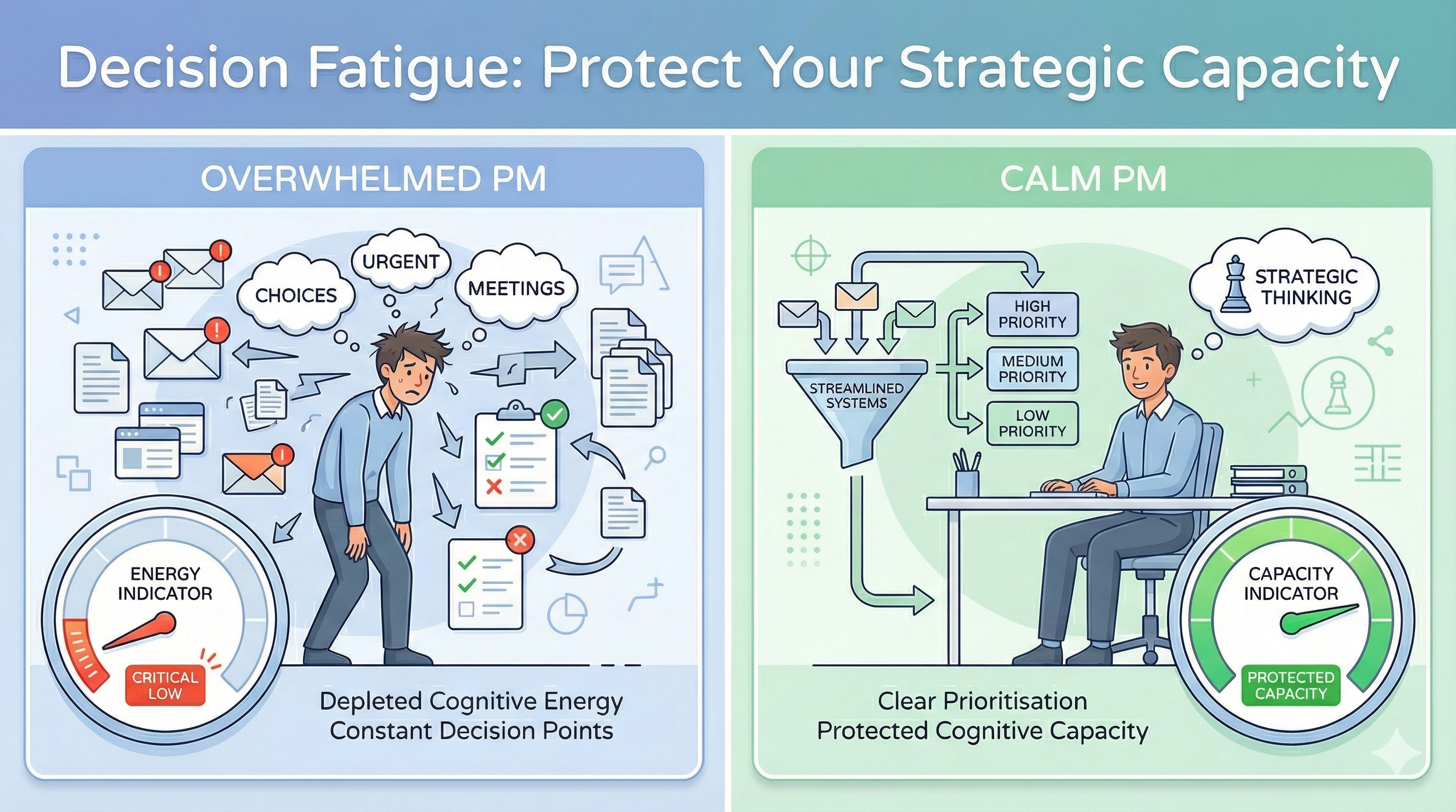
How do you see yourself during your working day?
Leveraging AI to Systematically Reduce Decision Load
Here's where generative AI becomes your decision fatigue ally. But working in clinical research means navigating corporate compliance, data security policies, and approved tool lists. Your AI strategy needs to work within these constraints while still delivering meaningful decision reduction.
The key is understanding which AI tools serve which purpose and how to use them safely within your organisation's guidelines.
Navigating Corporate AI Constraints
Most CROs and pharmaceutical companies have policies about AI tool usage. Before implementing any AI workflow, verify:
What's explicitly approved? Many organisations now have approved AI tools. Microsoft Copilot is increasingly common in enterprise environments. Some organisations approve ChatGPT Enterprise or Claude for Teams with proper data handling agreements.
What requires sanitisation? Even with approved tools, you likely cannot paste actual sponsor names, proprietary methodologies, specific pricing details, or any patient-related information. Learn to sanitise effectively: replace sponsor names with "Sponsor A" or generic descriptors, generalise therapeutic areas when needed, round budget numbers to ranges, use role titles instead of names.
What's your personal device freedom? For work that doesn't involve confidential data, your personal devices often offer more flexibility. Template creation, decision framework development, and learning workflows can happen outside corporate systems.
Tool Selection Based on Corporate Environment
If You Have Microsoft Copilot (Corporate Approved)
Copilot is increasingly standard in enterprise environments. It's your compliance-friendly decision reduction tool because it operates within your organisation's security boundaries and doesn't train on your data.
Use Copilot for:
Template library creation: Ask Copilot to generate communication templates directly in your corporate environment where you'll actually use them.
Prompt example:
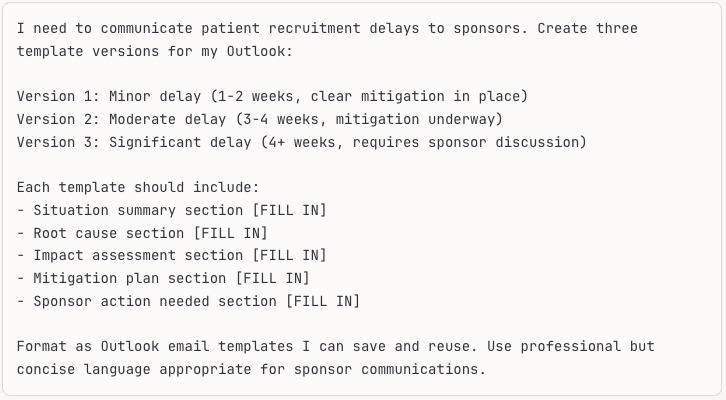
Copilot creates the templates directly in your email environment. Save each as a Quick Part or template. Now when you face a recruitment delay, you're not composing from scratch. You're filling in blanks. Decision eliminated.
Decision tree builders. Use Copilot to create flowcharts for common decision scenarios.
Prompt example:
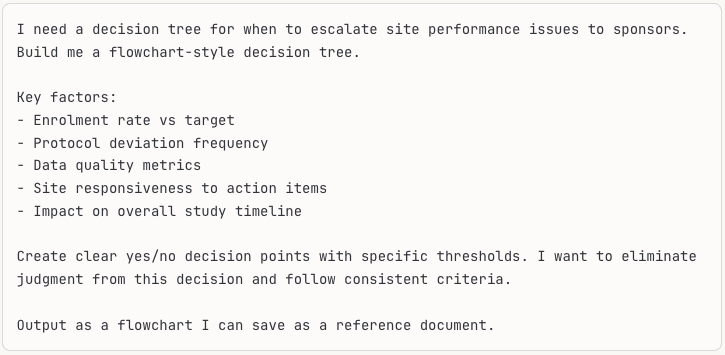
The result becomes your go-to reference. No more deliberating each time. Check the tree, follow the path, decision made in 60 seconds.
Meeting preparation automation. Use Copilot to generate meeting agendas based on your standard formats.
Prompt example:
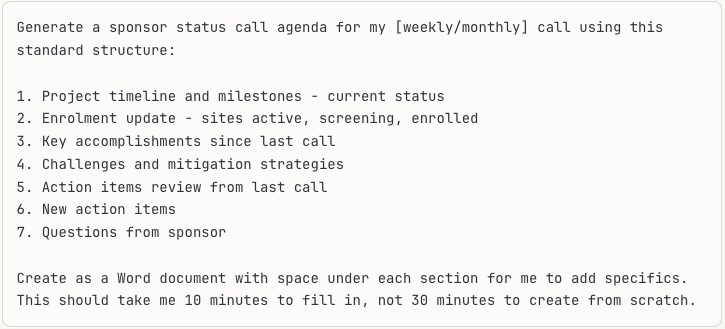
Save this as your standard template. Before each call, you're filling in content, not deciding structure, formatting, or sequence. Decision load reduced.
Email response drafting. When you receive a complex email requiring a thoughtful response but you're cognitively depleted, use Copilot as a drafting partner.
Prompt example:
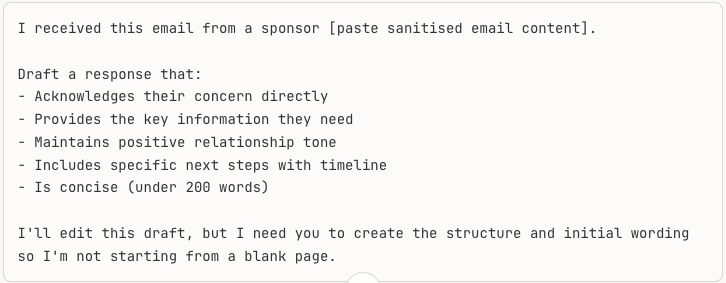
You're not outsourcing the response. You're eliminating the decision fatigue of "how do I start this?" and "how should this be structured?" Your expertise goes into refining the draft, not generating it from scratch.
If You Have Claude (Anthropic) Access
Some organisations approve Claude for Teams or Claude Pro accounts. Claude excels at longer-form content and complex reasoning—perfect for decision framework development.
Use Claude for:
Comprehensive decision framework creation. Claude's extended context window handles complex, multi-factor decisions better than other tools.
Prompt example:
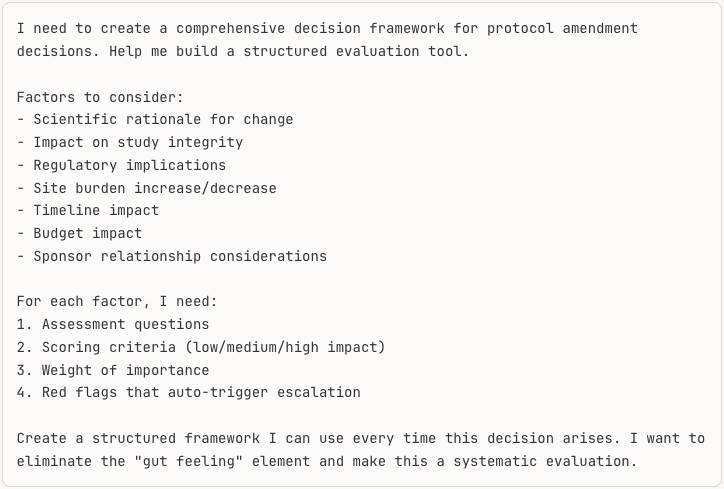
Claude will create a detailed, reusable framework. Convert it into a simple checklist or form you complete each time. The decision becomes systematic rather than deliberative.
Template refinement and variation creation. Claude excels at creating multiple variations of templates while maintaining consistency.
Prompt example:
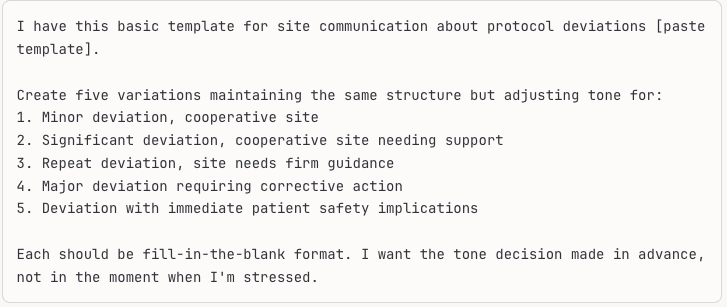
Now when a deviation occurs, you're selecting the appropriate template variation, not deliberating about tone and approach. Decision eliminated.
Strategic decision timing advisor. Use Claude to help you recognise when you're making decisions with compromised capacity.
Prompt example:
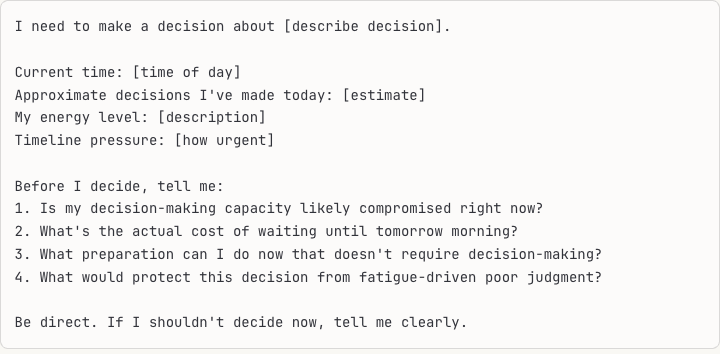
This external check prevents fatigue-driven poor decisions. Claude acts as your decision-timing advisor.
If You Have Perplexity Pro
Perplexity excels at research tasks, providing sourced information that eliminates decision-making about where to find information or whether sources are reliable.
Use Perplexity for quick protocol precedent research. When facing a protocol challenge, eliminate the decision of "have others faced this before?" with rapid research.
Prompt example:
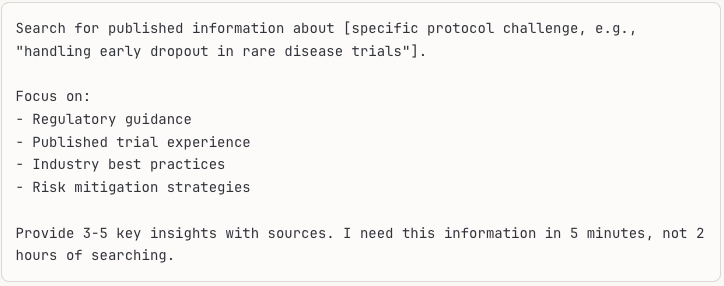
Perplexity returns sourced information fast. You're not deciding whether to research, where to look, or whether information is reliable. You're applying research findings to your situation.
Therapeutic area regulatory update checks. Stay current without decision fatigue about monitoring sources.
Prompt example:
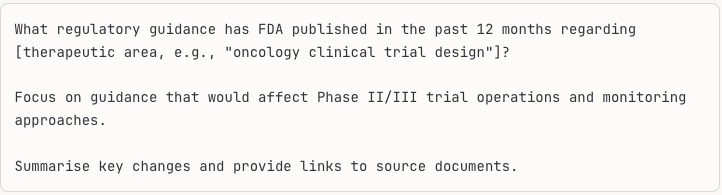
Regular quick checks (monthly or quarterly) eliminate the ongoing decision of "am I missing important updates?" and the time-consuming process of searching multiple sources.
Competitive intelligence for best practices. Research how other organisations handle common challenges without deliberating about approach.
Prompt example:
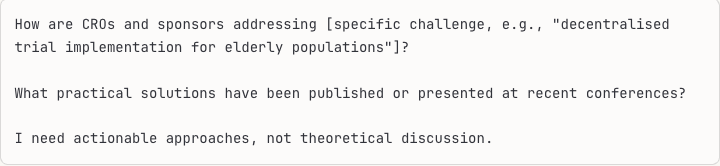
When facing a novel challenge, eliminate the decision fatigue of "how should we approach this?" by first checking what evidence-based approaches already exist.
For Personal Devices: Expanded AI Toolkit
When working outside corporate constraints on personal devices for non-confidential work, you have access to a broader toolkit for decision reduction system building.
ChatGPT (Plus or Free) for:
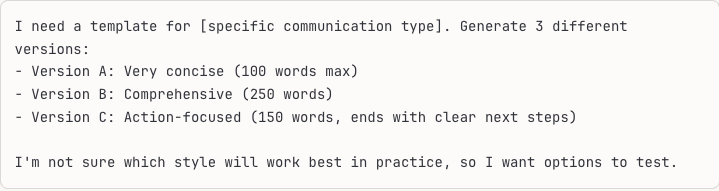
Rapid template iteration. Create and test multiple template versions quickly.
Prompt example:
Decision pattern recognition. Use ChatGPT to analyse your decision-making patterns and identify elimination opportunities.
Prompt example:
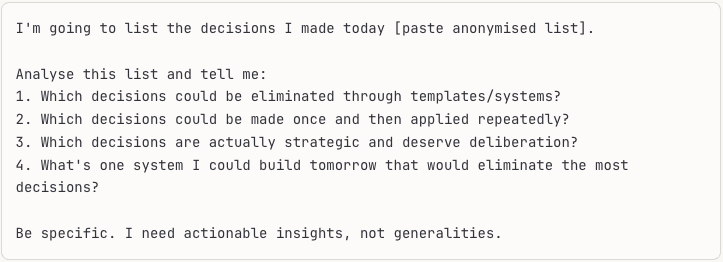
Gemini 2.0 Flash Thinking for:
Complex decision analysis with visible reasoning. When facing a genuinely strategic decision, use Gemini's thinking mode to see step-by-step analysis.
Prompt example:
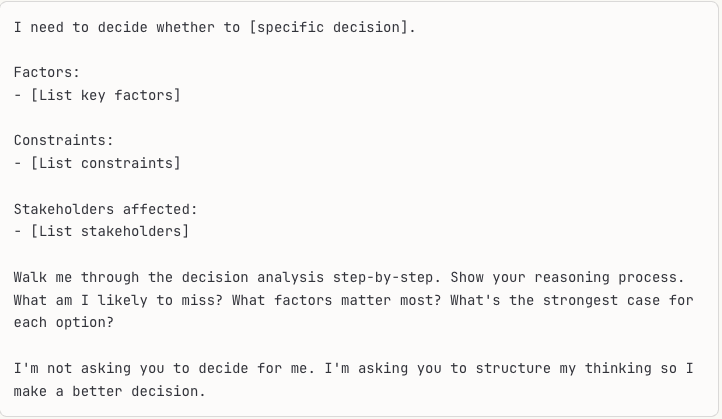
The visible thinking process helps you see logical gaps or overlooked factors before committing to a choice.
Building Your Corporate-Compliant AI Workflow
Here's a practical, compliance-friendly weekly workflow:
Monday morning (30 minutes):
· Use Perplexity to scan for relevant regulatory updates or industry news
· Review and note any items requiring template updates or new decision criteria
· Set strategic decision priorities for the week based on your peak cognitive capacity schedule
Daily (15 minutes):
· Morning: Use Copilot to generate meeting agendas from standard templates
· Afternoon: Use Copilot to draft routine communications
· End of day: Use Claude (if available) or Copilot to prep tomorrow's strategic decisions without actually making them
Weekly review (45 minutes):
· Audit decisions made that week
· Identify three most common decisions that could be systemised
· Use your approved AI tool to create one new template or decision tree
· Update existing templates based on what worked/didn't work
Monthly (90 minutes):
· Comprehensive decision pattern analysis
· Template library refinement
· Decision tree validation and updates
· New system creation for identified bottlenecks
Safety Guidelines for AI-Assisted Decision Reduction
Even with approved tools, maintain these practices:
Never paste:
· Actual sponsor names (use "Sponsor A" or generic descriptors)
· Proprietary methodologies or trade secrets
· Specific pricing details constituting competitive intelligence
· Patient data or anything approaching PHI
· Non-public information about your CRO's pipeline or financials
· Internal performance metrics or sensitive organisational information
Always verify:
· Regulatory references AI provides (check the actual guidance)
· Any "industry standard" claims (validate with real sources)
· Template language for accuracy and appropriateness
· Decision tree logic before implementing
Maintain human judgment for:
· Final strategic decisions (AI structures thinking, doesn't decide)
· Anything involving patient safety directly
· High-stakes sponsor relationship decisions
· Budget or resource allocation with significant impact
The goal isn't AI making your decisions. It's AI eliminating the hundreds of micro-decisions that deplete your capacity before strategic decisions even arrive.
This systematic approach to using AI for decision fatigue reduction is exactly what we build in AI training for clinical research teams—practical, compliance-friendly workflows that amplify your strategic capacity without compromising security or quality.
Quick Implementation Plan
Today: Track decisions for one full day and count them. Identify your five most frequent routine decisions. Create one template using your approved AI tool that eliminates one of those decision types.
This week: Build a communication template library for your five most common message types using Copilot or your approved tool. Create email processing defaults covering when, how, and in what sequence. Schedule strategic decisions for morning hours only.
This month: Create decision trees for your five most common escalation or judgment scenarios using Claude or Copilot. Eliminate 50% of routine decisions through systems. Implement a "no strategic decisions after 2pm" rule. Build decision support frameworks for recurring complex choices using AI-assisted analysis.
Once you experience the clarity of making strategic decisions with full cognitive capacity rather than depleted capacity, you'll protect this fiercely. The quality difference between a morning strategic decision and a 4pm strategic decision is dramatic. Same brain, same expertise, vastly different glucose and prefrontal capacity available.
Why This Matters for Your Career
Project Directors don't advance because they work harder. They advance because they consistently demonstrate sound strategic judgment. That judgment requires cognitive capacity. Decision fatigue isn't visible, but its effects on your strategic thinking absolutely are—to sponsors, to leadership, and to your team.
Templates and systems aren't crutches for weak PMs. They're decision-making capacity preservation for strategic PMs who understand that their value lies not in composing emails from scratch every time, but in making the high-stakes calls that protect sponsor relationships and project success.
This is the difference between being seen as operationally competent and being seen as strategically valuable. The former executes well. The latter earns sponsor trust, wins competitive bids, and advances to leadership roles.
Developing this kind of strategic self-awareness—recognising when your cognitive capacity is compromised and building systems to protect your best thinking for decisions that matter—is fundamental to the PM-to-PD transition we work on in clinical research project management mentoring.
Your brain's decision-making capacity is finite. The question isn't whether you'll face decision fatigue. It's whether you'll manage it proactively or let it manage you. Empowered PMs choose the former, building systems that preserve their strategic capacity for the moments when it matters most.
